
I Built My Own Newsletter Platform to Understand Every Layer of How It Works
I built NewsKit from scratch after one week on Substack. Here is the full technical breakdown of the architecture, stack, and decisions behind it.

Why I Built NewsKit
I signed up for Substack a few days ago with the goal of understanding how a modern publishing platform feels from the inside, and after about a week of using it, the familiar itch appeared. Substack is a full publishing platform with paid subscriptions, discussion threads, a discovery network, and a growing social layer. I had zero interest in rebuilding all of that. What I wanted was focused and specific: a lightweight newsletter tool I owned completely, ran on its own domain, and connected to my existing website through a single embeddable signup form. The moment I wrote out those requirements, the scope felt achievable and the project started to take shape. I set a firm boundary on scope from day one: paid subscriptions, comments, and social discovery were all out of scope. I called it NewsKit, a name that reflects the intent: a toolkit for newsletters, built to be operated by one person.
The Stack and Architecture
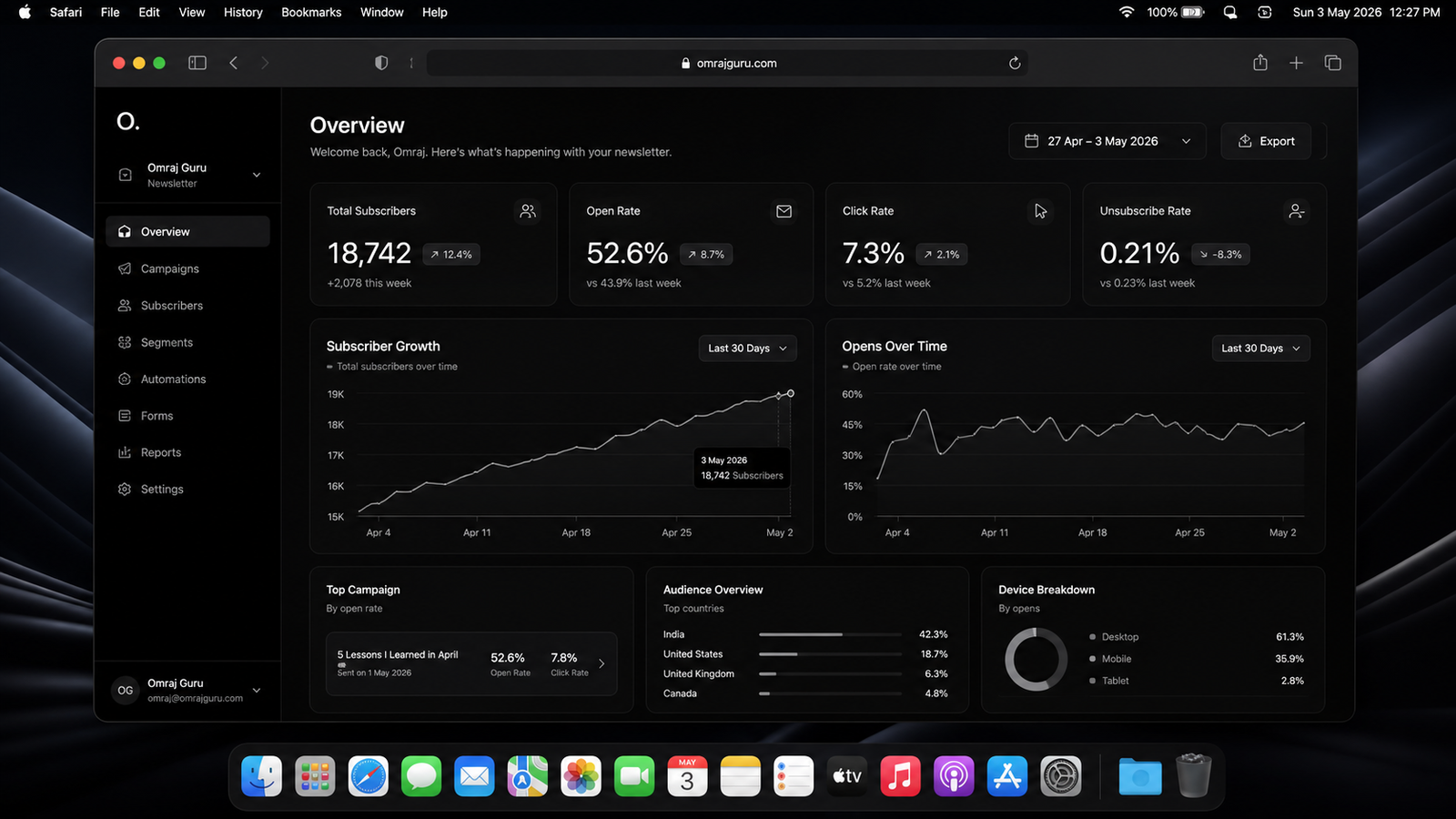
The architecture I chose keeps things operationally light. The frontend is a React application deployed on Vercel, and the entire backend lives inside Supabase, which handles the database, authentication, and serverless functions all under one project. For email delivery I integrated Mailgun, an API-driven service built for reliable bulk sending. The data fetching layer runs on TanStack Query, a library that manages how the app retrieves and caches data from the database, which keeps the interface accurate and fast with minimal manual work on my end. The whole stack runs with zero custom servers and zero devops configuration, and I manage everything from two dashboards. Every sensitive credential, like the Mailgun API key, lives encrypted inside the serverless functions and never touches the browser, which is the security boundary I hold on every app I build. The database enforces its own access rules at the row level, so even if application logic has a gap, the data layer holds firm.
Subscriber Management and Signup Flow
The subscriber management screen gives me a real-time view of everyone on the list, with each record showing an email address, a signup date, an active status, and any assigned tags. Tags are short labels I use to group subscribers into segments, so a technical post goes to one group and a design update goes to another. The embeddable signup widget is a small snippet I can drop onto any website with a single script tag, and when a visitor submits their email, it calls a serverless function that validates the address, saves the record to the database, and fires a welcome email automatically. I also built in optional double opt-in, where the subscriber receives a confirmation email and must click a link before their record goes active. The contacts screen supports manual additions as well, so anyone who signed up through a different channel can be added directly. All of this stays in sync across the interface through TanStack Query, so the list always reflects what is actually in the database.
Writing and Sending Newsletters
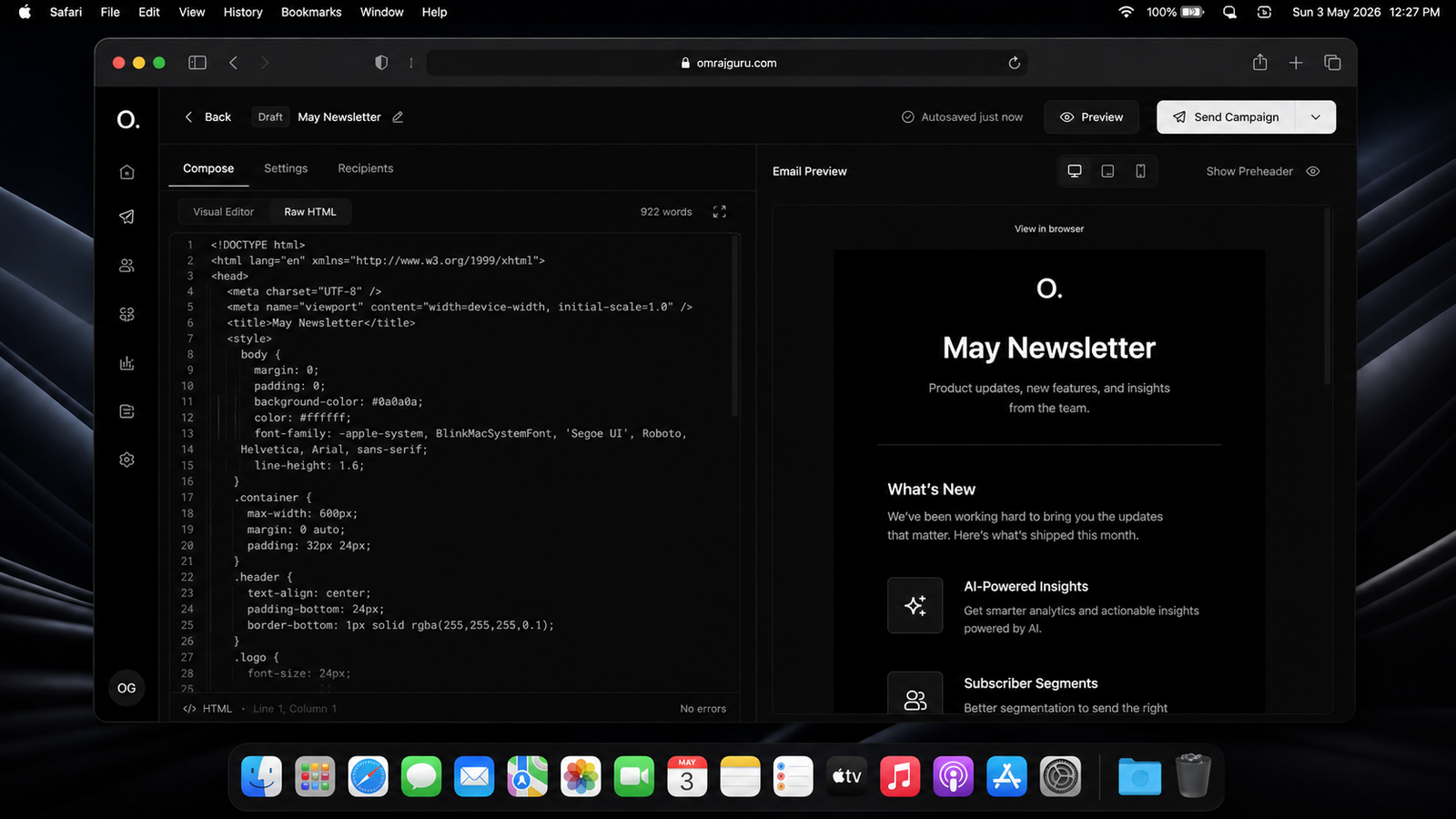
The compose screen supports two writing modes: raw HTML and plain text. Raw HTML gives me full control over layout, imagery, and typographic styling inside the email body, while plain text delivers a clean, markup-free message that works better for personal or conversational newsletters. A real-time autosave feature writes the current draft to the browser's local storage every few seconds, so a draft survives a tab close and reopens intact the next time I come back to it. A live preview panel renders the email exactly as it would appear in a recipient's inbox, updating as I type with zero manual refresh required. Before I send anything, a recipient filter panel shows me the exact subscriber count matching my selected tags, so I always know how many inboxes the email is going to reach. The send button triggers a serverless function that fetches the filtered list, builds the email payload, and dispatches it to every recipient through Mailgun in one batched call.
Analytics, Webhooks, and Security
NewsKit tracks open rates and click-through rates for every campaign through Mailgun's webhook system. A webhook is an automated callback: whenever a recipient opens an email or clicks a link, Mailgun sends a notification to a URL I registered, and a serverless function on my end receives that notification and writes the event into the database. The analytics dashboard then aggregates all of those events and displays per-campaign metrics alongside a subscriber growth chart showing weekly and monthly trends. On the security side, every incoming webhook gets its signature verified before the function acts on it, confirming the request genuinely came from Mailgun and arrived unaltered. The visual layer of the app uses a custom design system I built in pure black and white with monospace typography and subtle glassmorphism accents, all defined through CSS variables so the entire color system updates from one place. I wrote the full frontend in TypeScript, which catches type errors at build time before they reach the browser, and I used Zod to validate every data boundary including form inputs, API responses, and webhook payloads.
What I Learned Building It
Building NewsKit taught me more about serverless architecture and data fetching patterns in two weeks of actual building than I absorbed from documentation over a much longer period. I now operate a newsletter tool I own at every layer: the database schema, the business logic, the email configuration, and the frontend interface. I can inspect every query, modify any behavior that fits my workflow better, and extend any feature on my own timeline. The stack I assembled, React with TanStack Query on Vite, Supabase for the full backend, and Mailgun for delivery, proved to be a well-matched combination where each tool handles one responsibility clearly and hands off cleanly to the next. The codebase is small, readable, and structured in a way that makes it easy to return to months later and understand exactly what each file does. NewsKit solves the exact problem I defined at the start, and that is the best outcome a side project can deliver. Building it from scratch was the most direct path to understanding every layer of how a newsletter platform actually works.
Related projects
Better typography, built automatically
Eliminate font-induced layout shifts and manual preloading with a build tool that automatically detects, matches, and optimizes your typography.
OpenWhen. Your time, perfectly scheduled.
When. Sovereign scheduling for Vercel. Open-source, elegantly simple, and entirely yours. A more personal way to connect.
OpenBuilding the Engine
A technical overview of the architecture behind this portal, focusing on the integration of Next.js, Sanity, and custom storytelling components.
Open